
Simplifying live audio paging for schools, retailers and public spaces.
Product growth YoY
30%
Paging methods
5 supported
Required hardware
0
Project overview
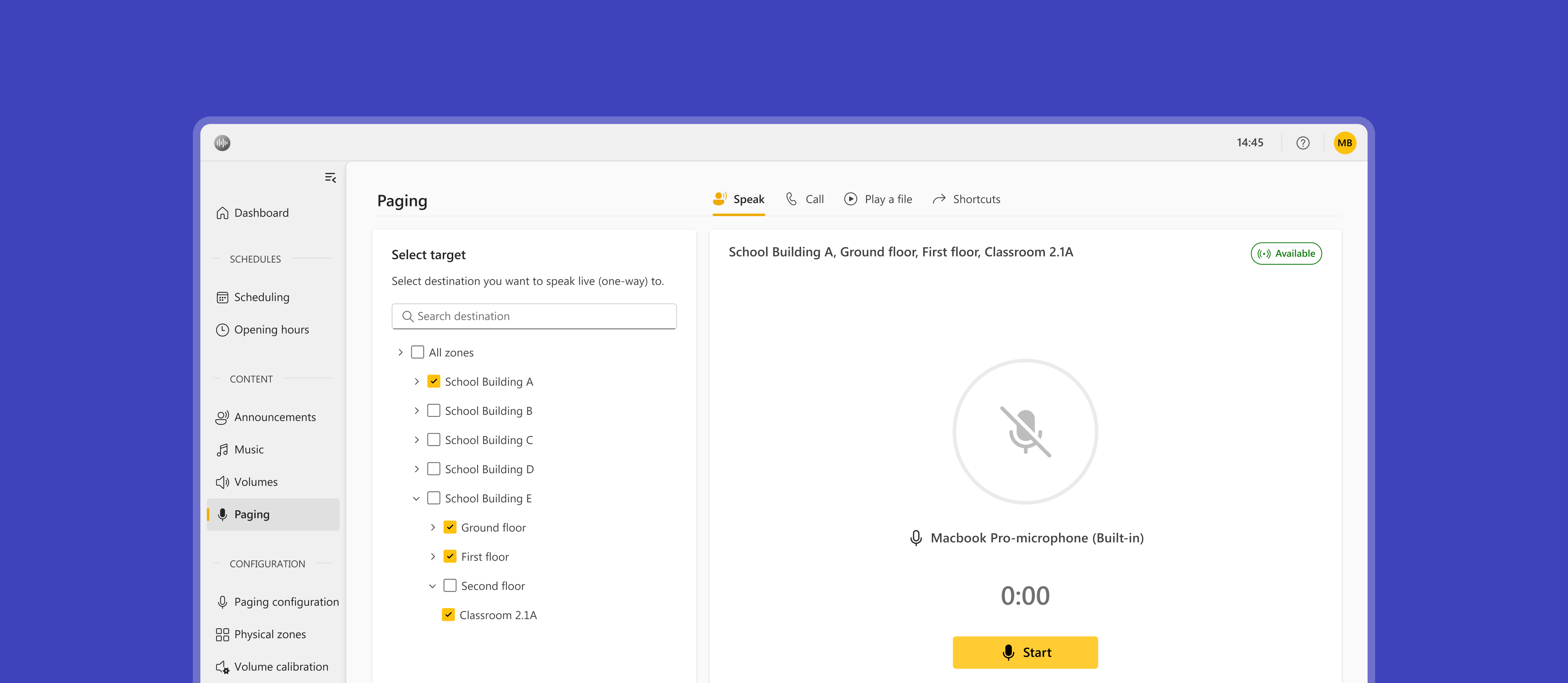
Web Paging was a new feature in Audio Manager Pro that transformed paging from a hardware-dependent feature to one accessible directly from the browser. Operators could select devices and zones directly within the interface and initiate various types of live announcement removing the need for dedicated paging consoles and making live announcements much more accessible for our customers.
I led the design of the feature, from early discovery and workflow definition through to detailed interaction design and delivery. A key focus was making paging accessible to operators who may have little or no technical expertise, allowing staff such as teachers, receptionists and retail employees to deliver announcements through a simple web-based workflow without the need for complex configuration or expensive hardware.
Key terminology 📖
Because network audio comes with its own vocabulary.
Paging
Broadcasting audio announcements to speakers across a site.
Zone
A physical space containing one or more speakers that can be addressed as a group.
Target
The destination of an audio broadcast, which can be one or more zones, individual devices, or a combination of both.
SIP
A communications protocol commonly used by phones and paging consoles.
Paging recipient
A pre-configured SIP endpoint that acts as a destination for paging calls. Each recipient is associated with specific zones or devices that will receive the announcement.
Flexible paging
without the need for dedicated hardware
Traditional paging relied on configuring paging recipients with fixed targets, such as individual devices or groups of zones within the network. Paging was only possible through SIP clients, typically SIP phones or paging consoles connected to the system, which limited access to paging and made ad hoc announcements cumbersome.
Web Paging enabled operators to initiate paging directly from the Audio Manager Pro web interface. Instead of relying on predefined recipients, operators could dynamically select the devices or zones they wanted to broadcast to without complex configuration or dedicated hardware.
The ability to page directly from the web interface was one of the most frequently requested features from customers, particularly in educational environments where staff needed a fast and accessible way to communicate updates, announcements, and incidents across their sites.
By allowing operators to select targets and initiate announcements directly within the browser, Web Paging removed the need for administrators to create and maintain paging recipients for every use case. This reduced configuration overhead and eliminated the reliance on dedicated SIP hardware for day-to-day paging.
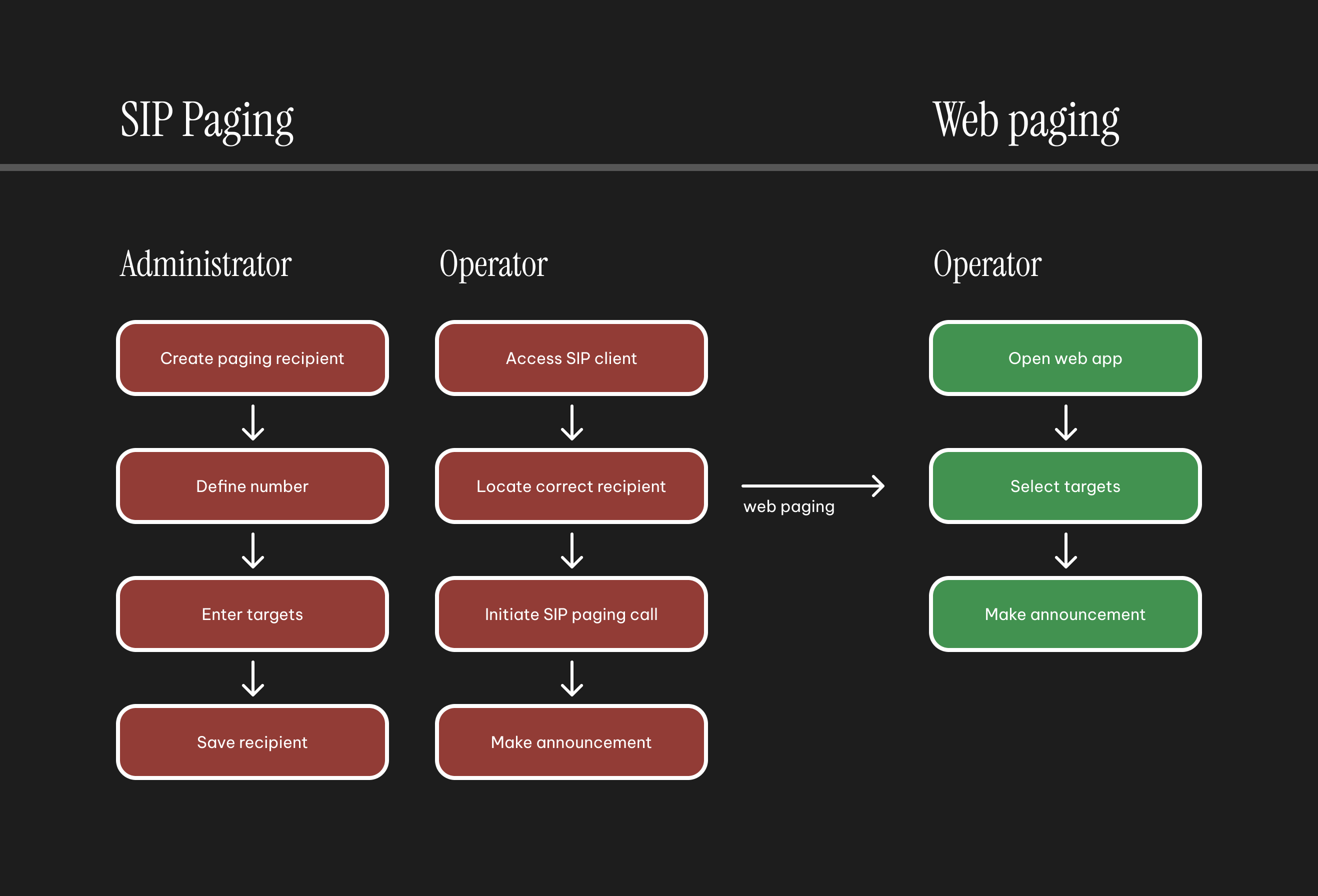
I designed the feature to initially support three key types of paging. Speak (one-way) paging allows operators to broadcast one-way audio to a zone or multiple zones. Talk (two-way) allows for two-way communication, by connecting to the input of the targeted device. Thirdly, play a file would allow the operator to trigger a pre-recorded audio file to a single or multiple zones.
The design focussed on a simple interface, with target selection in the left panel and the main actions for triggering and ending their announcements in the main panel. Feedback on selected targets was shown clearly, as well as a badge highlighting the availability of their targets. The core design challenge was fitting in all key information, and actions, without overwhelming the UI and the operators who were predominantly non-technical users working in busy environments. Through multiple iterations and user tests we were also to come up with something understandable, but also flexible enough to cover our key use-cases.
Reducing repetition
with shortcuts
While Web Paging made ad hoc announcements significantly easier, many customers still relied on a small number of recurring paging workflows. After the initial release we realised that operators frequently needed to repeat the same target selections and paging settings, particularly when playing pre-recorded audio files, making the process unnecessarily repetitive.
Administrators also wanted a way to standardise common paging actions and reduce the risk of operator error. In environments such as schools, factories, and public facilities, targeting the wrong zone or device could result in confusion or missed announcements.
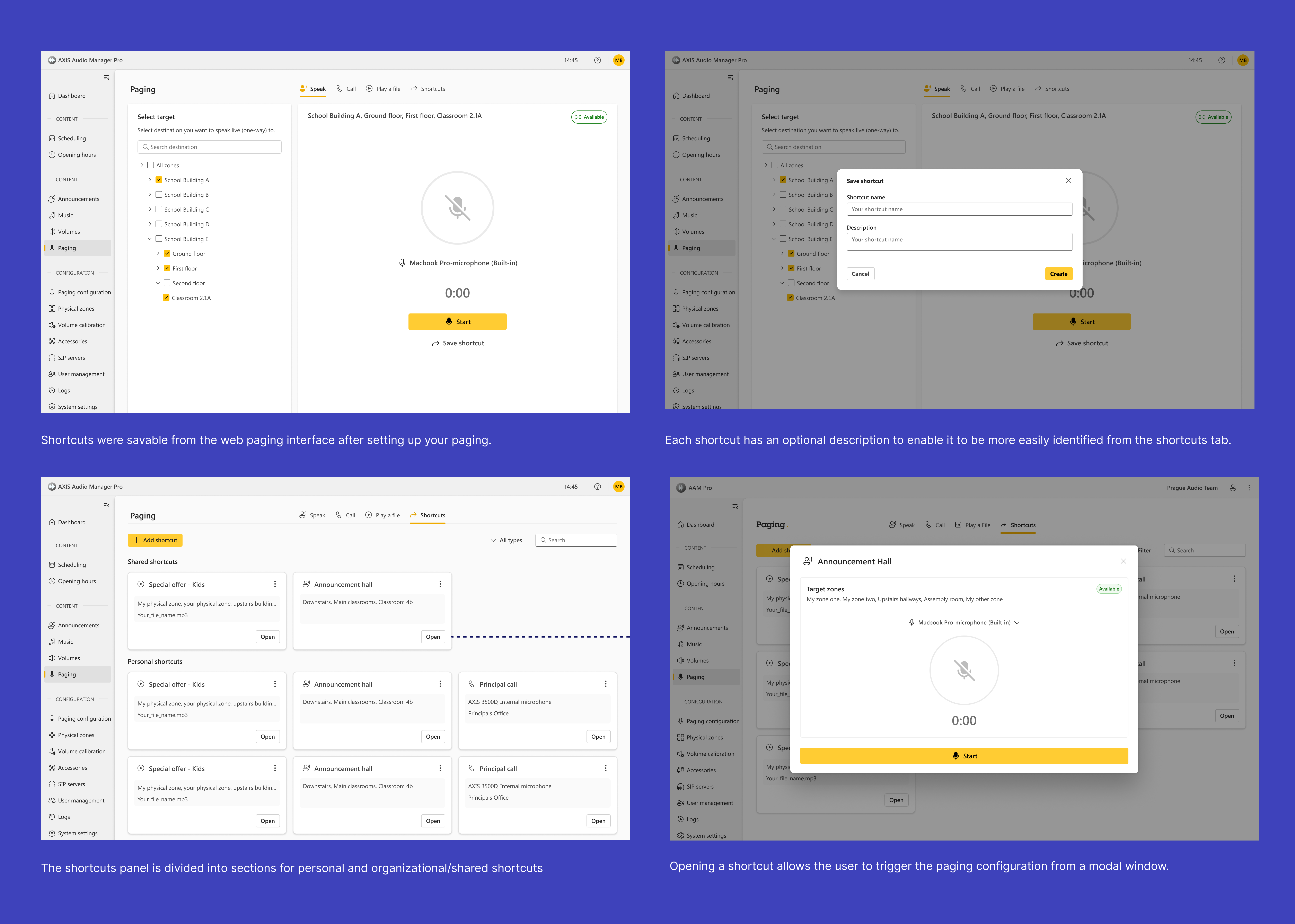
To address these needs, I designed Shortcuts: reusable paging configurations that could store both the selected targets and paging method. Operators could create personal shortcuts for their own workflows, while administrators could create shared shortcuts available to all operators on the server. Each shortcut included a name and description, allowing users to quickly identify its purpose and launch common paging actions with minimal setup.
Extending the feature
with text-to-speech
Customers frequently requested the ability to create spoken announcements from text, eliminating the need to record audio files or make live announcements. Early discussions focused on an offline text-to-speech solution, which would have required speech synthesis to be generated locally on the server.
During discovery, I worked with engineering to explore the implications of both offline and cloud-based approaches. While an offline solution offered advantages in environments with limited internet connectivity, the quality of audio was not strong enough and early prototype testing received broadly negative responses from our customers. The initial testing helped align the team around an online architecture that could leverage modern cloud speech services and provide a noteably better experience with broader language support.
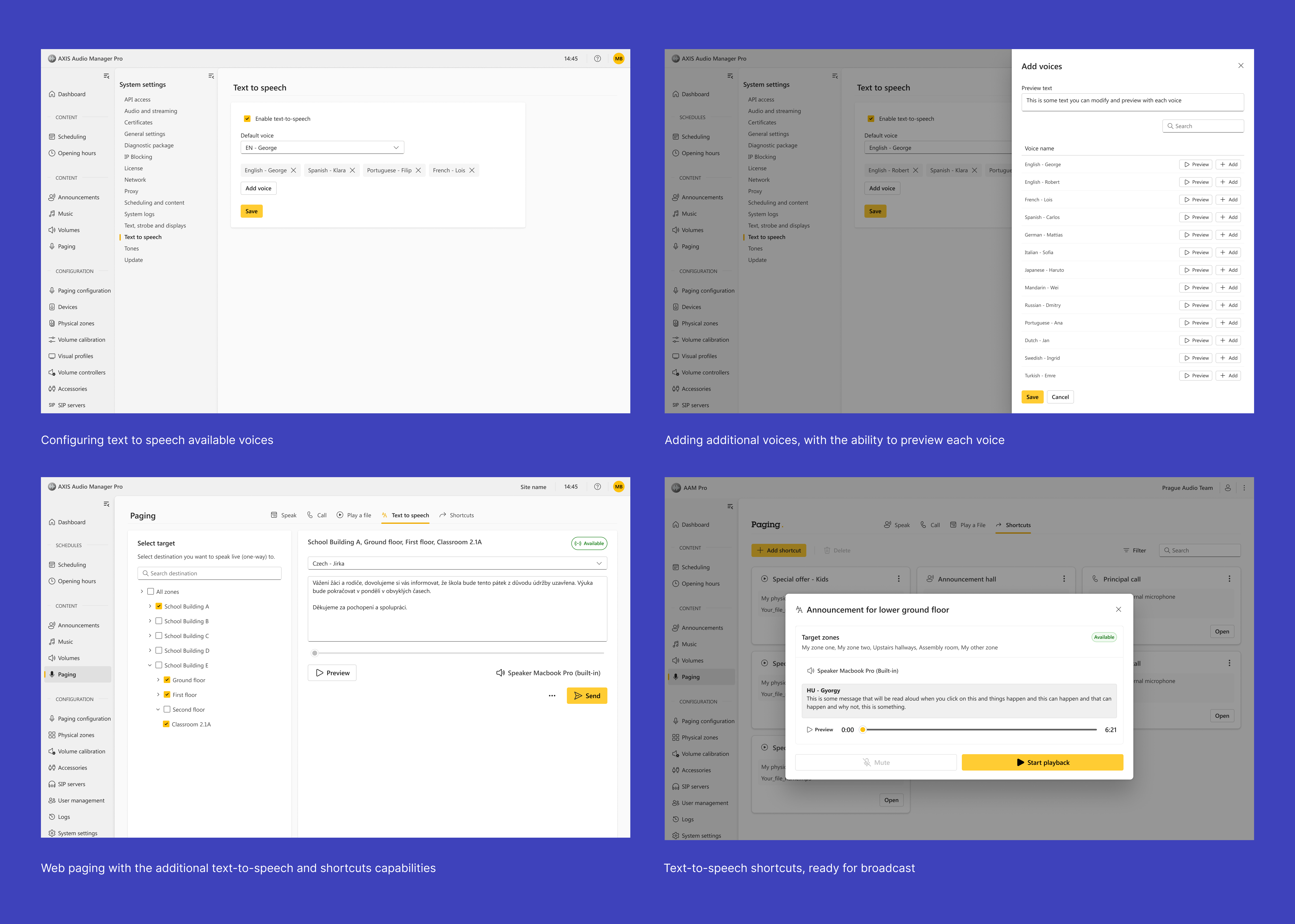
The resulting solution allowed operators to enter announcement text directly within the paging workflow and generate natural-sounding speech on demand. By adopting an online approach, we were able to support a wider range of languages and voices while creating a foundation for future improvements. We also built the feature in an agnostic way meaning future versions will allow the selection of a TTS engine that best suits the customers needs best.
Key learnings
and takeaways
This project focused on simplifying one of the most complex workflows within Audio Manager Pro. By moving paging from dedicated SIP hardware into the web interface, I helped create a more flexible and accessible experience that better supported the needs of operators, particularly within educational environments. Feedback from customers was hugely positive and strengthened our position within the education sector, our largest customer segment.
The project also allowed me to be more proactive in driving the product direction, influencing a key technical decision around text-to-speech. By steering the product away from a low-quality offline implementation towards a cloud-based approach capable of delivering a significantly better user experience we managed to release a much higher quality feature.